Walk through any sabzi market on a Sunday morning. One sabziwala has the freshest coriander, another has the best price on onions, and a third gives the right weight every time. Nobody buys everything from one cart. You buy by what you are cooking.
Free AI image tools work the same way. Bing Image Creator is a good start, but it is not the only free option, and each alternative is better at a different job.
In our experience, owners pick a tool from a “best of” list, then hit a limit, a public gallery or a licence surprise. So we checked six tools on their own official pages on 13 November 2026, and list only what those pages say. Free limits change often, so check again before a campaign. If you are new to Bing’s tool, start with our Bing Image Creator free guide.
Nobody buys everything from one cart. You buy by what you are cooking.
Pick by the job, not by a ranking
We are not ranking these tools on quality, because that depends on your prompt and use. Ask three questions instead:
- What is the job? A festive post, a blog header, a product background or a quick edit of your own photo.
- What does “free” mean here? A daily limit, a weekly allowance or a monthly one. Some tools do not publish a number at all.
- Who can see your images, and who owns them? Some free tiers publish your images in a public gallery.
Pick the stall that fits the job.
Say you run a home bakery in Lucknow and need ten Diwali hamper images this week. Speed and simple edits matter more than art styles. That narrows the list.
ChatGPT and Gemini: make images by chatting
Both let you describe an image in a chat, then ask for changes in plain words.
ChatGPT. OpenAI’s help page says ChatGPT Images “is available on all tiers”, including Free. The Free tier FAQ says image creation has its own usage limit, separate from chat, and ChatGPT tells you when you hit it. OpenAI does not publish a number. It says images can follow instructions to add text or make the background transparent, and you can pick any aspect ratio.
Drawback: the free limit is not stated, so you cannot plan a big batch around it.
Gemini. Google’s help page says image generation with Nano Banana 2 is available without a Google AI plan. You must be signed in, and editing images needs you to be 18 or over. Gemini is available in India, and its supported languages include Hindi, Gujarati and Marathi. Free limits are “standard limits”, based on compute, refreshing every 5 hours up to a weekly limit.
Drawback: without a plan, downloads are 1K resolution, and image work shares your overall Gemini allowance.
For the bakery, either could turn one hamper photo into several festive variations. Our ChatGPT image generation guide covers ChatGPT step by step.
Canva and Adobe Firefly: AI inside a design tool
These suit you when the image is part of a finished design.
Canva. Canva’s help page says Canva Free has “limited access to Standard and Premium AI tools”. Creating an image with Canva AI is a Premium AI tool, and it draws from a shared monthly allowance that resets each month. The help page does not give a fixed number for Free.
Drawback: every AI tool you use in Canva eats into the same small allowance.
Adobe Firefly. Adobe’s Firefly page says the free plan gives “free daily generations” for images, video and audio, and Adobe’s credits FAQ says these limits refresh each day on a curated set of models. Adobe does not publish the daily number. You need an Adobe ID.
Drawback: free users get a limited set of models, and partner models such as Google’s and OpenAI’s need a paid plan.
The screenshots in this post come from the tools’ own official pages, so you see what those pages actually say.

If the bakery wants the image on a festive layout with its logo and prices, a design tool saves a step. Our post on Canva as your graphic designer shows how.
Ideogram and Leonardo: free, but your images are public
Both have real free tiers, with one catch.
Ideogram. Its pricing page says eligible free accounts receive weekly credits when signing in with Google, Apple or Microsoft, and “the amount may vary”. By default, all images are published to its community, and only Plus and Pro subscribers can generate unpublished images.
Drawback: do not use it for unreleased products or client work.
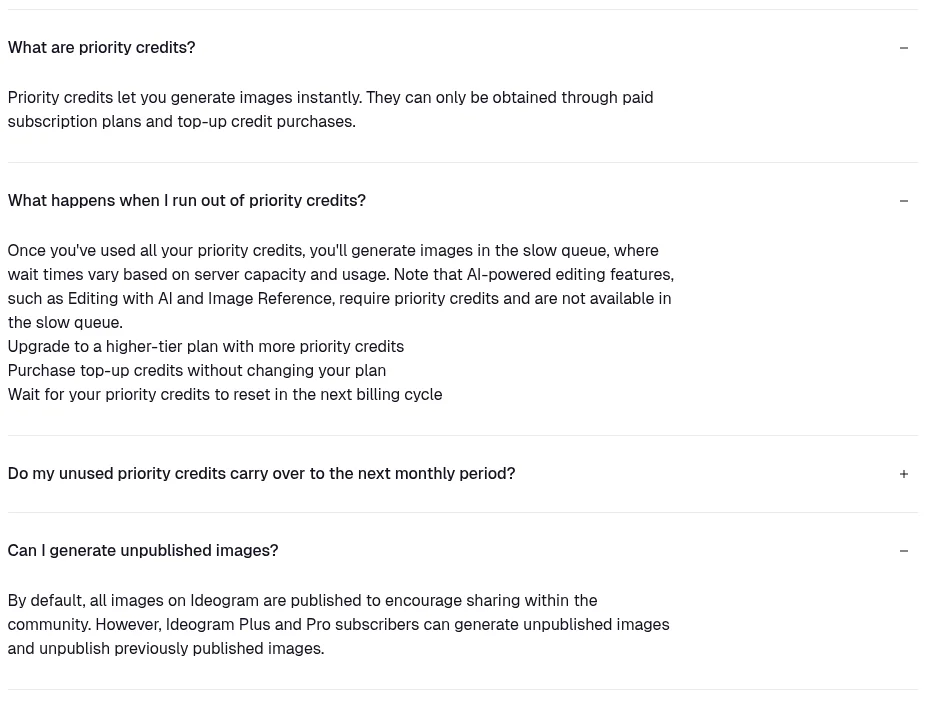
Leonardo. Its pricing page lists a Free plan with 150 fast tokens a day, “Auto” model only, and public creations. Tokens reset daily.
Drawback: on the free tier, Leonardo holds rights to use your images, and you get a licence to use them, including commercially.
On some free tiers, your images sit out on the stall.
For the bakery, these suit trying styles, not a secret hamper launch.
Compare them side by side
Every cell below comes from the tool’s own pages, checked on 13 November 2026.
| Tool | Free limit (as stated) | Sign-in | Commercial use (from its terms) | Images public on free? |
|---|---|---|---|---|
| ChatGPT | Separate image limit, number not stated | Not stated | You own the output | Not stated |
| Gemini | Standard limits, refresh every 5 hours, weekly cap | Required | Google won’t claim ownership | Not stated |
| Canva | Limited share of a monthly AI allowance | Canva Free account | You own the output, any lawful purpose | Not stated |
| Adobe Firefly | Limited free daily generations | Adobe ID | Allowed for features without the beta label | Not stated |
| Ideogram | Weekly credits, amount may vary | Google, Apple or Microsoft | Allowed, per its pricing FAQ | Yes, by default |
| Leonardo | 150 fast tokens a day | Not stated | Licence for commercial use on free tier | Yes |
“Not stated” means that tool’s official pages did not give a figure or a yes/no on the day we checked. It does not mean the images are public, or that there is no limit.
Sources, checked 13 November 2026: ChatGPT Images help, Free tier FAQ and terms; Gemini image help, limits, availability and Google Terms; Canva AI access and AI terms; Adobe Firefly product page, credits FAQ and Firefly FAQ; Ideogram pricing; Leonardo pricing.
Read the terms before you use images in ads
“Free to use” and “free to use commercially” are different things.
- ChatGPT: OpenAI’s terms say you own the output, but similar outputs may go to other users.
- Gemini: Google’s terms say it won’t claim ownership of content you generate, and ask you to use discretion before publishing.
- Canva: its AI terms say you own your output and may use it for any lawful purpose, but also suggest independent advice before commercial use.
- Adobe Firefly: Adobe says outputs from features without the beta label can be used commercially, and that Firefly models are trained on licensed and public domain content.
- Ideogram and Leonardo: see the table above.
None of these terms stops someone else’s rights applying, so avoid real people, logos and brand names in prompts. This is not legal advice. For prompts that work in Bing, see Bing Image Creator prompts that work.
The short version
- Pick free AI image tools by the job, not by a ranking.
- ChatGPT and Gemini are good for chatting your way to an image and quick edits.
- Canva and Adobe Firefly suit finished designs.
- Ideogram and Leonardo free images are public, so keep private work elsewhere.
- Free limits change often. Check each tool’s own page before planning.
FAQs
What is the best free alternative to Bing Image Creator?
It depends on the job. For quick chat-based edits, try ChatGPT or Gemini. For finished designs, try Canva or Adobe Firefly.
Which free AI image tool keeps my images private?
Ideogram and Leonardo free images are public. The other four do not say this on the pages we checked, so read each privacy setting yourself.
Can I use free AI images for my business?
Most of these tools allow commercial use in their terms, with conditions. Read the terms and avoid real people, logos and brand names.
Does Gemini image generation work in India?
Google lists India as a country where Gemini Apps are available, and image generation is included without a paid plan.
Not sure which image tool fits your brand?
We help founder-led businesses build content and visual workflows that save time. Talk to us through our form or on WhatsApp at +91 99131 53530. The first conversation is free.